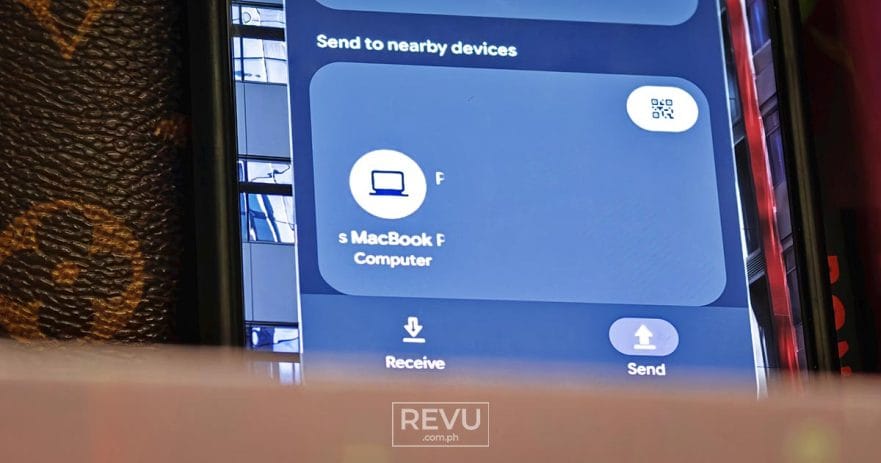
The long‑standing wall between the Android and iOS ecosystems is finally coming down. Google is rolling out a Quick Share update that works directly with Apple’s AirDrop, so you can send photos, videos, and files between the two platforms without messy workarounds. For years, moving stuff between Android and Apple has been one of the most frustrating chores in mobile technology. Now, it’s as easy as tapping a button.
Quick Share has turned into a true cross‑platform bridge. If your devices are within Bluetooth range and Wi‑Fi is on, sending a file from an Android flagship to an iPhone, iPad, or Mac feels almost native. More than a convenience upgrade, it’s a milestone: two of the biggest tech companies finally letting their ecosystems talk to each other.

Is your phone supported?
Compatibility is the deal‑breaker. Before you can send a single file, the only question is whether your phone makes the cut. If it’s not on the list, you’re stuck waiting. If it is, you’re suddenly in a world where Android and iOS finally play nice. No hacks, no cloud links, no “just email it.”
This cross-platform interoperability actually kicked off late last year when Google brought AirDrop compatibility to Quick Share, starting with the Pixel 10 series. Right now, support is limited to the newest premium models, but the list is expected to grow fast. Think of this as the beta wave — the flagship showcase before the feature trickles down to mainstream devices.
- Devices supported right now:
- Google Pixel 10 Series, Pixel 9 Series, Pixel 8a
- Samsung Galaxy S26 Series
- OPPO Find X9 Series, Find N6
- vivo X300 Ultra
- Coming soon:
- Samsung Galaxy S25 Series, Galaxy S24 Series, Galaxy Z Flip7, Galaxy Z Fold7, Galaxy Z Flip6, Galaxy Z Fold6, Galaxy Z TriFold
- OPPO Find X8 Series
- OnePlus 15
- HONOR Magic V6, Magic8 Pro
Xiaomi will also be supported, though Google has not yet announced which specific Xiaomi models will receive the feature.
@revuphilippines The Google Android-to-Apple rivalry just got a lot friendlier. 🤝 Seamlessly sharing from the #OPPOFindX9 and the #OPPOFindX9Ultra to our Apple MacBook Pro 🍎 using the new #QuickShare x AirDrop integration. It's fast, native, and finally here! Head to 👉 www.revu.com.ph for the guide and supported device list! #iOS #RevuDotComDotPH @Alora Uy Guerrero @monch ♬ original sound – REVU Philippines
Sharing files from our OPPO Find X9/OPPO Find X9 Ultra to our Apple MacBook Pro
How to share from Android to Apple
Sending files from Android to Apple devices used to mean juggling cloud links or messaging apps. Now, it’s nearly as smooth as native AirDrop. Here’s how it works:
- Open Quick Share on your Android unit and select the files you want to send. (Samsung users, make sure “Share with Apple devices” is toggled on in Quick Share settings.)
- Have the recipient open their Apple device’s Control Center (or Finder on a Mac) and set AirDrop visibility to Everyone for 10 minutes.
- The Apple device will appear in your Quick Share menu. Select it.
- The recipient will receive an AirDrop prompt. Once they accept, the transfer begins.
How to share from Apple to Android
The integration isn’t one‑way. Apple users can also beam files directly to Android devices without detouring through email or chat apps. The process mirrors the familiar AirDrop flow:
- On the Apple device, select the files to share, tap the Share icon, and choose AirDrop.
- Make sure the receiving Android has Quick Share Receive mode turned on. (Samsung users again need “Share with Apple devices” enabled.)
- The Android model will appear in the AirDrop menu. Select it and wait for the Android user to accept the prompt.
The universal alternative: QR codes
Not every device is invited to the party yet. For users with older hardware, Google still offers a streamlined fallback: QR codes. It’s not as slick as native integration, but it’s effective.
To use this method:
- Select your files on Android, open Quick Share, and tap Use QR code.
- The recipient scans the code with their Apple device’s camera.
- A secure webpage opens in their default browser, and the transfer begins automatically.
- Once finished, they can download and save the file directly to local storage.
Our new iOS-to-Android transfer process ensures your data moves with you. Wirelessly migrate your passwords, photos, messages, apps, contacts, and even your home screen layout to your new Android device.
— Android (@Android) May 12, 2026
Learn more: https://t.co/fJjNO25ahJ"
This update marks a significant shift in the tech landscape, effectively tearing down one of the most stubborn barriers between Android and iOS users. As we demonstrated with the OPPO Find X9/OPPO Find X9 Ultra and an Apple MacBook Pro, the integration is as seamless as advertised. While the initial rollout is restricted to newer flagships, the rapidly expanding support list suggests that native cross‑platform sharing is finally becoming a universal standard rather than a premium perk.
Finally, the ecosystems are acknowledging that households don’t stick to just one brand. For once, the walls are coming down, and the future of file sharing feels refreshingly frictionless — fast, simple, and built for the way people actually live.
Learn About This Author